
App screens
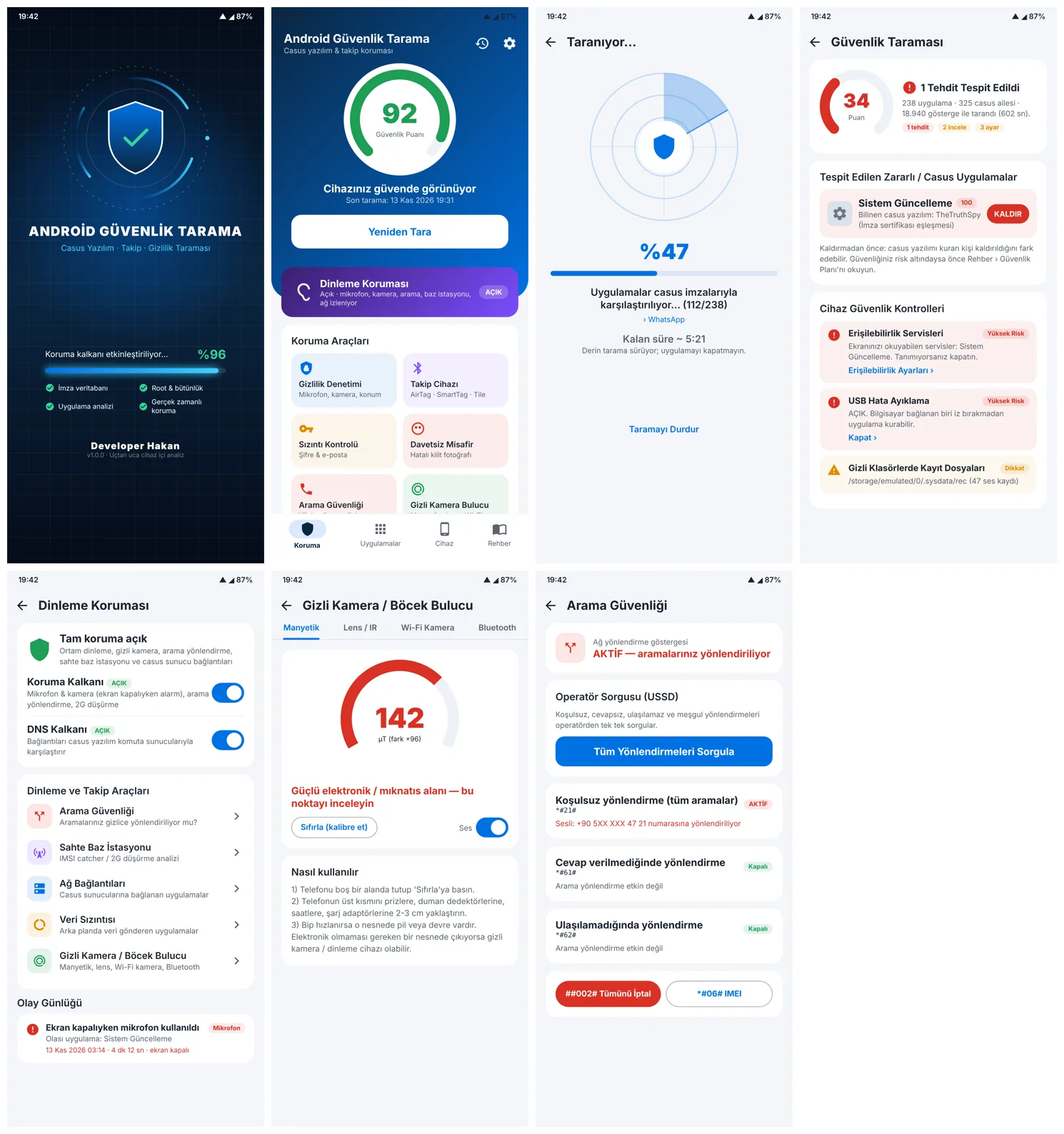
How the spyware scan works
The scan takes about 10 minutes. Every app is matched by signing certificate, package name and behaviour indicators against the spyware database.
- Security score (0–100): 85+ green, 60–85 orange, below 60 red.
- Detected spyware: e.g. TheTruthSpy disguised as “System Update”, matched by signing certificate, with a REMOVE button.
- Apps to review: mark apps you trust as trusted.
- Device checks: accessibility services, USB debugging, missing screen lock, hidden audio recordings; each opens the right setting.
- PDF report with date and time.
Eavesdropping protection: is my phone tapped?
- Protection shield: alerts when the microphone or camera turns on while the phone is locked, when calls are forwarded or the network is downgraded to 2G.
- DNS shield: watches connections to spyware command servers via a local on-device VPN profile; traffic is not sent elsewhere.
- Fake base station: IMSI catcher and 2G downgrade analysis.
- Event log with timestamps.
More protection tools
- Privacy audit of microphone, camera, location and SMS access
- Tracker scan for AirTag, SmartTag and Tile
- Password leak check
- Intruder photo on wrong unlock attempts
- Call forwarding check via USSD (*#21#, *#61#, *#62#) and cancel all with ##002#
- Hidden camera and bug finder with magnetometer, lens/IR, Wi-Fi and Bluetooth
- Forensic check for spyware installer files, hidden audio recordings and dangerous SMS links
- Real-time protection for new apps, daily scheduled scan, stealth “Calculator” mode and PIN lock
What to do if spyware is found
- Do not delete it immediately; create the PDF report and send it to another device.
- If you feel unsafe, get help first: the person who installed it may notice.
- Remove it; disable device admin rights first if asked.
- Change passwords from a clean device and check WhatsApp linked devices.
For legal evidence or suspected targeted attacks, a forensic examination is needed: digital forensics. iPhone version: iPhone spyware detection app.
Technology stack
KotlinAndroidJetpack ComposeVpnServiceUsageStatsBluetooth LEUSSDPDF
Frequently asked questions
How do I know if my Android phone has spyware?
Run a full scan with Android Security Scan; it matches every app against spyware signatures, lists risky settings and gives a 0–100 security score.
Does the app send my data to a server?
No. Scanning and the DNS shield run on the phone; the DNS shield is a local VPN profile.
Why is it not on Google Play?
It is distributed directly as an APK; get it only from the developer via WhatsApp.