

Can an iPhone get spyware?
Yes. Although iOS is a secure operating system, mercenary spyware used in targeted attacks — Pegasus, Predator and Graphite — has infiltrated iPhones through zero-click exploits that require no tap at all. The more common threat, though, is commercial tracking apps such as mSpy, FlexiSpy or Cocospy: usually installed by someone with physical access to the phone, via the iCloud account or a jailbreak, they secretly monitor messages, location and calls.
Because these apps hide themselves, they don't appear on the home screen. The security scanning app looks for the known traces these threats leave behind and for suspicious system changes, then gives a clear result on a single screen: clean, or risk detected.
What does the app scan for?
Scanned threats are grouped under three headings. State-grade / advanced: Pegasus (NSO Group), Predator (Intellexa), Graphite (Paragon), Hermit, Reign (QuaDream), NoviSpy and known exploit chains. Commercial spyware (stalkerware): mSpy, FlexiSpy, Cocospy, Spyic, Hoverwatch, KidsGuard Pro, uMobix, Eyezy, XNSPY and similar. Jailbreak: tools such as Cydia, Sileo and checkra1n, plus files/permissions left behind after a jailbreak.
The app has three tabs: the Device tab shows the phone's overall security status, the Security tab runs the signature-based threat scan, and the Spy Check tab shows detailed checks targeting hidden tracking apps. When the scan finishes, it lists how many signatures were checked and which threats came back clean, one by one.
How do I know if my phone has spyware?
None of these signs is proof on its own, but if you see several together, a scan is recommended: the battery draining unusually fast, the phone heating up while idle, unexpected mobile data usage, a VPN or configuration profile in Settings you don't recognize, unknown devices on your Apple ID, two-factor codes arriving without your request, and odd behavior that started after the phone was in someone else's hands.
If you received a "threat notification" from Apple, take it seriously; according to Apple's official guide, you can verify that the notification is genuine at account.apple.com.
What to do if a risk is detected
Update iOS to the latest version, remove configuration profiles and VPNs you don't recognize, change your Apple ID password and remove unknown devices from your account. If you are at high risk (journalist, lawyer, executive, activist), turn on Apple's Lockdown Mode.
No scanning app can detect every threat with one hundred percent certainty; the app relies on known signatures and indicators. If you suspect a targeted attack, you need an expert examination with forensic tools such as MVT.
For businesses and repair shops
The same scanning engine can also be used for corporate device fleets, repair shops and businesses that buy and sell used phones. In phone inspections, spyware and jailbreak checks are included as part of the MobilEksper inspection report. I can also build a similar iOS security app under your own brand.
What I offer
24 threat signatures
Known signatures across state-grade, commercial spyware and jailbreak categories.
Pegasus & Predator traces
Advanced threat indicators originating from NSO, Intellexa, Paragon and QuaDream.
Hidden tracking app detection
mSpy, FlexiSpy, Cocospy, Spyic, Hoverwatch, KidsGuard Pro and similar.
Jailbreak check
Cydia, Sileo, checkra1n and traces left after a jailbreak.
Instant scan
One-tap scan; results list how many signatures were checked and what came back clean.
Native iOS design
A clean, fast experience built with SwiftUI following Apple's interface guidelines.
Technologies I use
Official documentation and resources
Standards and official documentation I follow in projects:
- Apple – About Lockdown Mode
- Apple – Threat notifications and protection against mercenary spyware
- MVT – Mobile Verification Toolkit (Amnesty International)
- Citizen Lab – spyware research
Example projects
A selection of live projects serving real users.
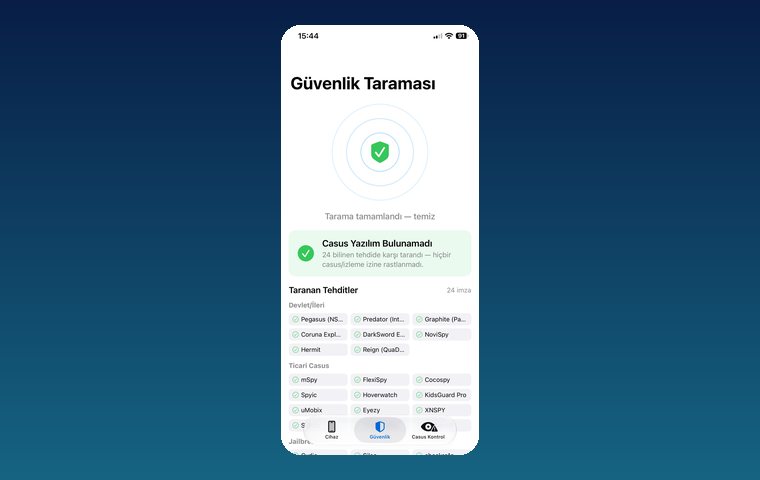
iPhone Security Scan — Spyware Detection
iOS app that scans for state-grade spyware, hidden tracking apps and jailbreak traces.
View
MobilEksper — Phone Inspection & Repair Shop Software
AI-assisted device inspection, IMEI and parts checks, repair service and inventory management.
View
Ezan Vakti – Gümüşpala Hizmet (iOS)
Prayer times, Ramadan calendar, qibla and worship tracking; live on the App Store.
ViewHow we work
Free intro call
We clarify needs, existing systems and goals together.
Quote & roadmap
Scope, technology, timeline and budget within 24 hours.
Staged development
Weekly demos and a live test environment.
Launch & support
Go-live, training and ongoing maintenance.
Free pre-analysisThe first meeting and roadmap are completely free, with no obligation.
Staged delivery and approvalYou review each module on a test environment before we move on.
Written scope and rightsScope, delivery and source code rights are defined in the contract.
Frequently asked questions
Can an iPhone get infected with spyware?
Yes; mercenary spyware like Pegasus has infiltrated iPhones in targeted attacks. More common are tracking apps such as mSpy and FlexiSpy, installed via iCloud or a jailbreak by someone with access to the phone.
How can I tell if there is a hidden tracking app on my iPhone?
Fast battery drain, heating, unexpected data usage, or an unfamiliar profile or VPN are all warning signs; for a definitive result, run a scan with a security scanning app.
Which spyware does the app scan for?
Advanced threats such as Pegasus, Predator, Graphite, Hermit, Reign and NoviSpy; commercial spy apps such as mSpy, FlexiSpy, Cocospy, Spyic, Hoverwatch, KidsGuard Pro, uMobix, Eyezy and XNSPY; and jailbreak tools such as Cydia, Sileo and checkra1n.
If the scan comes back clean, is my phone definitely safe?
It means the phone is clean against known signatures; no app can offer a one hundred percent guarantee. If you suspect a targeted attack, an expert forensic analysis is recommended.
How do I protect myself from Pegasus?
Keep iOS up to date, don't tap unknown links, turn on Lockdown Mode if you are at high risk, and take Apple threat notifications seriously.
Is my phone being monitored? How can I tell?
Your phone should be scanned if you notice these signs together: the battery draining unusually fast, heating while idle, unexpected mobile data usage, an unfamiliar VPN or configuration profile in Settings, unknown devices on your Apple ID and verification codes arriving without your request. For a definitive result, scan for known spyware and tracking app traces with an iPhone security scanning app.
Is my phone being tapped?
Listening in on a regular phone call requires spyware installed on the device or access to your account. Unusual heating during a call, the screen turning on by itself, or the orange (microphone) or green (camera) dot lighting up in the iOS status bar for no reason are signs to watch for. Check which apps access the microphone under Settings > Privacy & Security > Microphone, and scan the device.
Can spyware be installed on an iPhone?
Yes. Mercenary spyware such as Pegasus and Predator has infiltrated iPhones in targeted attacks. More common are tracking apps like mSpy, FlexiSpy and Cocospy, installed by someone with physical access to the phone via your iCloud account or a jailbreak. These apps don't appear on the home screen; their known traces are found with a scanning app.
Is my spouse or partner tracking my phone?
The most common tracking methods are not spy apps but settings left switched on. In the Find My app, check the People tab to see who you share your location with; under Settings > [your name], review the devices linked to your Apple ID and your Family Sharing members; and open Settings > Privacy & Security > Safety Check. Then scan the device for spyware and jailbreak traces.
Is someone else reading my WhatsApp messages?
In WhatsApp, open Settings > Linked Devices; if there is a computer or browser you don't recognize, log it out. Turn on two-step verification. Since messages can also be read by a spy app installed on the device, scan the phone as well.
Is my location being tracked?
Check who you share your location with in the Find My app, and which apps use your location under Settings > Privacy & Security > Location Services. iPhone notifies you about an unknown AirTag or tracking device moving with you; if you receive such an alert, take it seriously.
Is Pegasus on my phone? How can I tell?
Pegasus is targeted, expensive spyware; it picks targets such as journalists, lawyers, executives and activists. If you received a threat notification from Apple, verify it at account.apple.com, update iOS and turn on Lockdown Mode. The security scanning app checks for known Pegasus indicators; if you suspect a targeted attack, an expert forensic analysis with tools such as MVT is required.
Is someone else using my iCloud account?
If there is an unfamiliar device in the device list at the bottom of Settings > [your name], remove it from your account, change your Apple ID password and keep two-factor authentication turned on. Anyone with access to iCloud can reach messages, photos and location through backups; some spy apps work exactly this way.
What should I do if spyware is found on my phone?
Update iOS to the latest version, remove configuration profiles and VPNs you don't recognize, change your Apple ID and email passwords from another device, and remove unknown devices from your account. If necessary, set up the device from scratch rather than from a backup. If you are at high risk, turn on Lockdown Mode.
Does a factory reset remove spyware?
Most tracking apps installed on the phone are removed by a reset. However, if tracking happens through your iCloud account, or you restore the same backup after resetting, the problem continues; so change your Apple ID password before resetting.
How can I scan my phone myself?
The iPhone security scanning app checks 24 known threat signatures with a single tap: state-grade spyware such as Pegasus, Predator and Graphite, commercial tracking apps such as mSpy, FlexiSpy and Cocospy, and jailbreak tools such as Cydia, Sileo and checkra1n. The result appears on a single screen as clean or risk detected.
Is there a scan for Android phones too?
The current scanning app is for iPhone. Security scanning solutions for Android devices and corporate device fleets are developed on request.