
4 ways to access your messages
- Linked device / WhatsApp Web: If someone had your phone briefly, a computer may have been linked via QR code
- Backup: Someone who knows the password of the iCloud or Google Account holding your backup can restore it to another phone
- Verification code: Someone who gets your SMS code can set up your account on their own phone
- Tracking app: An app installed on the phone can send out screen or notification content
Secure your WhatsApp
- Settings > Linked Devices: log out of all sessions
- Settings > Account > Two-step verification: set a PIN
- Switch your chat backup to an end-to-end encrypted backup
- Change your Apple Account / Google password and remove unknown devices
- Set a screen lock on your phone and don't share the code
- Check your phone for signs of tracking
Your safety comes first
If you suspect you are being tracked and are in danger, removing the app right away may alert the person tracking you; first get support from a safe phone. Contact local emergency services or a domestic-violence support line; in Turkey: ALO 183 Social Support Line, 155 Police or 112, and the KADES app.
What I offer
Linked devices
Find and log out of WhatsApp Web sessions.
Two-step verification
Stop your account being set up on another phone.
Encrypted backup
Protect your backup with a password.
Account security
iCloud and Google password, device list.
Screen lock
Protection against physical access.
Scan
Look for traces of tracking apps.
Technologies I use
Example projects
A selection of live projects serving real users.
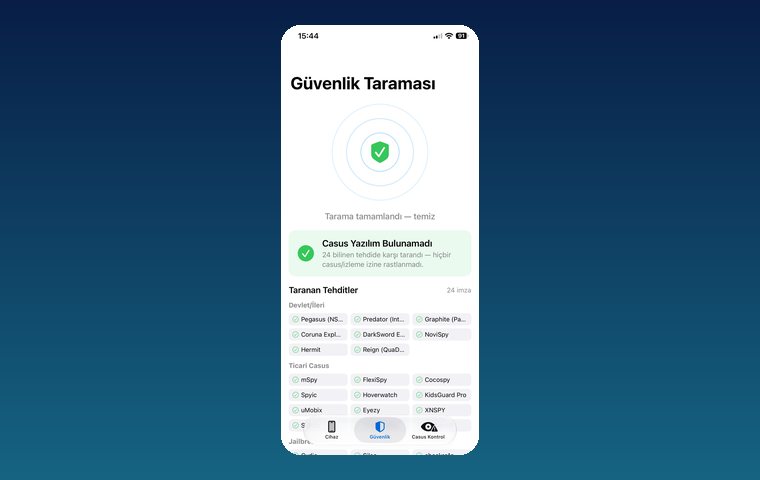
iPhone Security Scan — Spyware Detection
iOS app that scans for state-grade spyware, hidden tracking apps and jailbreak traces.
View
MobilEksper — Phone Inspection & Repair Shop Software
AI-assisted device inspection, IMEI and parts checks, repair service and inventory management.
ViewHow we work
Free intro call
We clarify needs, existing systems and goals together.
Quote & roadmap
Scope, technology, timeline and budget within 24 hours.
Staged development
Weekly demos and a live test environment.
Launch & support
Go-live, training and ongoing maintenance.
Free pre-analysisThe first meeting and roadmap are completely free, with no obligation.
Staged delivery and approvalYou review each module on a test environment before we move on.
Written scope and rightsScope, delivery and source code rights are defined in the contract.
Frequently asked questions
Is someone reading my WhatsApp messages? How can I tell?
If WhatsApp > Settings > Linked Devices shows a session you don't recognise, your messages may be read from that device; log out of the session and turn on two-step verification.
How do I know if WhatsApp Web is open?
The Linked Devices list shows active sessions and when they were last active; log out of every session you don't recognise.
Can my partner see my messages from my backup?
It is possible if they know the password of the iCloud or Google Account holding the backup. Change the password, turn on two-step verification and make your WhatsApp backup end-to-end encrypted.
Can I scan my phone myself?
The iPhone security scan app checks for 24 known threat signatures: spyware such as Pegasus and Predator, commercial tracking apps such as mSpy, FlexiSpy and Cocospy, and jailbreak traces. For Android, the checks you can make in Settings are explained on this page.
What should I do if I find out I am being tracked?
If you suspect you are being tracked and are in danger, removing the app right away may alert the person tracking you; first get support from a safe phone. Contact local emergency services or a domestic-violence support line; in Turkey: ALO 183 Social Support Line, 155 Police or 112, and the KADES app.