

What does restaurant management software solve?
Orders no longer come through a single door: food delivery platforms, phone calls, WhatsApp, guests at the table and the counter are all tracked on different screens and in different notebooks. The result is forgotten orders, mixed-up bills, late deliveries and a till that does not balance at the end of the day.
Kassa Restoran pulls this chaos into a single Order Center. Every order lands on the same board and is tracked with colour-coded cards through the awaiting confirmation, preparing, on the way and completed stages. Late orders are flagged automatically and new orders are announced with a sound alert; you can switch between board and list views and search by order number, customer name or phone number. Operation cards at the top show daily sales, unpaid orders, delays and the channel breakdown in real time.
Modules of the restaurant system
Every module in Kassa is connected to the same order flow; what you do in one is instantly reflected in the others:
- Platform integration: Orders from Yemeksepeti, Getir Yemek and Trendyol Yemek, Türkiye's major food delivery platforms, arrive automatically and status updates are sent back to the platform. Details: food delivery platform integration.
- QR menu and waiter call: Guests order from the table without downloading an app and can call a waiter or ask for the bill. See QR menu software.
- Tables, bills and quick sale: Floor plan, split payments and a touch-screen till for takeaway and counter sales. See restaurant billing software.
- Kitchen display and tickets: Item-level preparation, target times and automatic tickets on an 80 mm thermal printer. See kitchen display system (KDS).
- Couriers and cash on delivery: Courier assignment, live map and end-of-day cash reconciliation. See delivery and courier tracking software.
- Phone orders and incoming calls: Find customers by phone number and, with suitable hardware, see the caller's number in the panel. See caller ID phone ordering.
- Menu, stock and supply: Products, categories, option groups and photos are managed in one place; changes appear instantly on the QR menu and at the till, and items at critical stock levels are monitored.
- Reports: Daily and periodic revenue, sales by channel, payments by type, delay and cancellation rates, and peak hours.

Multiple branches and user permissions
If you have more than one branch, you manage them all from a single account. Each branch's orders, kitchen, couriers and reports are tracked separately, and you can compare branches side by side.
Users are defined by role and only see the screens they are authorised for:
- Owner and manager: all branches, reports and settings
- Cashier: quick sale and payments
- Waiter: tables, bills and QR menu requests
- Kitchen: the kitchen display only
- Courier: their assigned orders and the delivery screen
Cloud-based, no installation required
Kassa runs in the browser; you use it on your existing computers, tablets and phones, and it can be added to the home screen like an app (PWA). No extra hardware is required, though a thermal printer is recommended for tickets.
Each business's data is kept separate, and personal data is handled according to the retention periods of KVKK, Türkiye's data protection law. Once approved, you enter your branch, menu and integration details and can start using it the same day.
Applying and custom development
To use Kassa Restoran you apply via kassa.com.tr. If your business needs a custom workflow, report or integration, you can message Kassa's developer on WhatsApp: Hakan Sevimoğlu, an İzmir-based freelance full stack developer with 18 years of experience.
If you are considering a self-service ordering point, see restaurant ordering kiosk; if you want an app under your own brand, see food ordering app development.
What I offer
Single Order Center
Platform, phone, QR, table and till on one board
Platform integration
Yemeksepeti, Getir Yemek, Trendyol Yemek
Kitchen display
Target time, delay alerts, item-level ready
Courier tracking
Live map and end-of-day cash reconciliation
Multi-branch
One account, orders and reports per branch
Role-based access
Owner, manager, cashier, waiter, kitchen, courier
Technologies I use
Example projects
A selection of live projects serving real users.
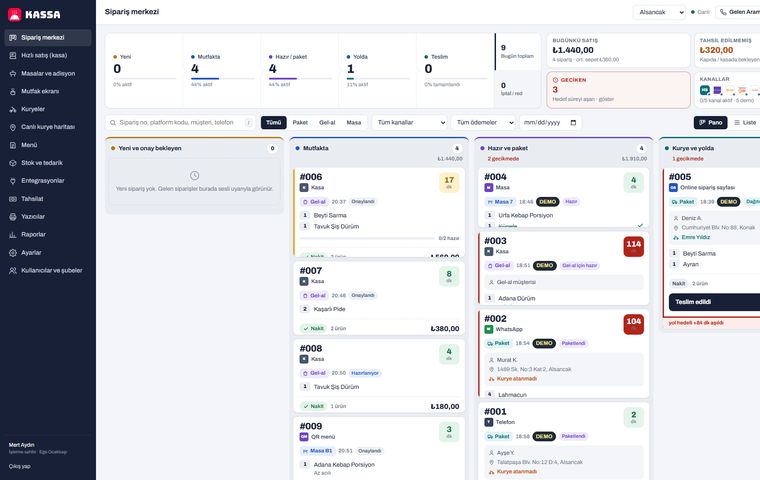
Kassa Restaurant — One-Panel Orders, Kitchen and Courier System
Yemeksepeti, Getir Yemek and Trendyol Yemek orders, QR menu, table billing, kitchen display, live courier tracking and cash-on-delivery reconciliation in one cloud restaurant POS.
View
Restaurant POS & Order Management
Tables, kitchen and checkout in one system.
View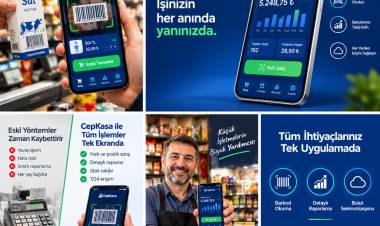
Kassa — iPhone POS & Inventory App
Barcode sales, stock, customer credit and profit reports for grocery stores and kiosks; works offline.
ViewHow we work
Free intro call
We clarify needs, existing systems and goals together.
Quote & roadmap
Scope, technology, timeline and budget within 24 hours.
Staged development
Weekly demos and a live test environment.
Launch & support
Go-live, training and ongoing maintenance.
Free pre-analysisThe first meeting and roadmap are completely free, with no obligation.
Staged delivery and approvalYou review each module on a test environment before we move on.
Written scope and rightsScope, delivery and source code rights are defined in the contract.
Frequently asked questions
What is the difference between a restaurant POS and an order management system?
A classic POS only records sales at the till. Kassa records till sales too, but also brings platform, phone, QR menu and table orders onto one board and connects the kitchen, couriers and reports to the same flow.
Which food delivery platforms does Kassa integrate with?
Yemeksepeti, Getir Yemek and Trendyol Yemek, Türkiye's major food delivery platforms. Orders arrive in Kassa automatically and the order status is reported back to the platform.
Does restaurant management software need extra hardware?
No. Kassa runs in the browser on your existing computers, tablets and phones. A thermal printer is recommended for tickets.
Can I manage several branches from one account?
Yes. All branches are managed from one account; each branch's orders, kitchen, couriers and reports are tracked separately.
How soon can I start using Kassa?
You apply via kassa.com.tr; once approved, you enter your branch, menu and integration details and can start the same day.
Can I have a custom feature added for my business?
Yes. Kassa's developer, Hakan Sevimoğlu, is a freelance software developer; message him on WhatsApp with your custom workflow, report or adaptation request.