

Where is time lost on phone orders?
When the phone rings, the customer's name, address and previous order are asked for from scratch every time and written in a notebook or on a scrap of paper. At peak times the address is noted down wrong and the order reaches the kitchen late.
In Kassa, phone orders go into the same Order Center as every other channel. You can explore the whole system on the Kassa restaurant POS and order management system page.
Main service page for this topic: restaurant POS and order management system
Phone ordering software: fast entry with customer records
- A call comes in; the customer is looked up by phone number.
- A returning customer's details are found, while a new customer is created along with their record.
- The order is entered with items, options and notes.
- The order lands in the Order Center and is sent to the kitchen.
In the Order Center you can search by order number, customer name or phone number in seconds, so when a customer calls back asking "what happened to my order?", it is found immediately.
Caller ID: showing the incoming call number in the panel
With suitable hardware, the number of the incoming call is shown in the Kassa panel. Whoever answers does not have to type the number; the customer record is found from it and order entry speeds up.
- The incoming call's number appears in the panel.
- Registered customers are found by their number.
- New customers are saved with their first order and are ready on later calls.
Which hardware suits your business's phone line is decided together during setup.
After the phone order: kitchen, couriers and reports
A delivery order entered by phone lands on the kitchen display and ticket templates in exactly the same way; details are on the kitchen display system (KDS) page. If the order goes out with your own courier, see the delivery and courier tracking software page for assignment and payment on delivery.
In reports, phone orders appear separately in the sales breakdown by channel, so you can track with real data how many orders the phone brings in compared with other channels.
Applying and custom adaptation
To use Kassa, apply via kassa.com.tr or message Hakan on WhatsApp. If you need an adaptation for your phone line or order flow, Hakan can develop it as a freelance software developer; for connections to external systems, take a look at the API integration page.
What I offer
Incoming call display
With suitable hardware, the number shows in the panel
Customer by number
Registered customers found instantly by phone
Fast order entry
Together with the customer record on one screen
Single Order Center
Phone orders in the same place as other channels
Quick search
Find by order no., name or phone
Channel report
Phone orders shown separately in reports
Technologies I use
Example projects
A selection of live projects serving real users.
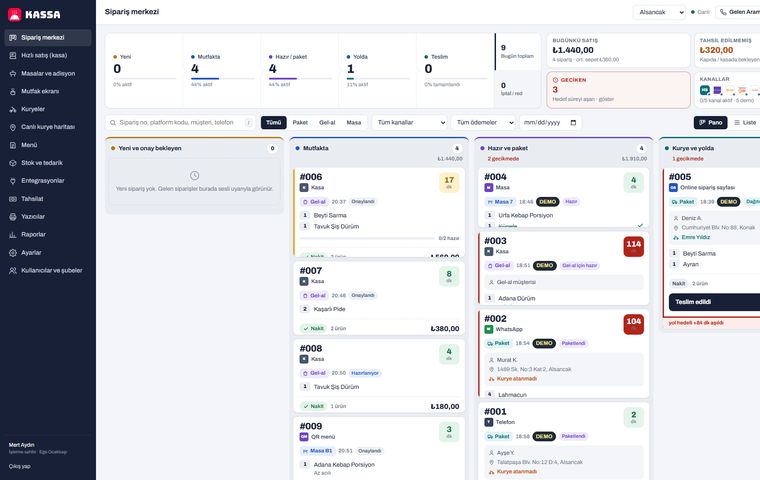
Kassa Restaurant — One-Panel Orders, Kitchen and Courier System
Yemeksepeti, Getir Yemek and Trendyol Yemek orders, QR menu, table billing, kitchen display, live courier tracking and cash-on-delivery reconciliation in one cloud restaurant POS.
View
Restaurant POS & Order Management
Tables, kitchen and checkout in one system.
ViewHow we work
Free intro call
We clarify needs, existing systems and goals together.
Quote & roadmap
Scope, technology, timeline and budget within 24 hours.
Staged development
Weekly demos and a live test environment.
Launch & support
Go-live, training and ongoing maintenance.
Free pre-analysisThe first meeting and roadmap are completely free, with no obligation.
Staged delivery and approvalYou review each module on a test environment before we move on.
Written scope and rightsScope, delivery and source code rights are defined in the contract.
Frequently asked questions
What is a restaurant caller ID system?
It is a feature that shows the number of an incoming call to the restaurant in the order panel. In Kassa, with suitable hardware, the caller's number is shown in the panel and the customer record is found by that number.
What do I need to see the incoming call number?
Passing the incoming number to the panel requires hardware suited to your phone line; the right hardware is chosen together during setup.
Can I enter phone orders without caller ID?
Yes. Phone orders are entered manually together with the customer record; returning customers are found by typing their phone number.
How do phone orders reach the kitchen?
The entered order lands in the Order Center, is shown on the kitchen display and, if you wish, a kitchen ticket prints automatically.
Can I report on phone orders separately?
Yes. Reports include the sales breakdown by channel, with phone orders shown separately from other channels.