

Why do you need billing software?
With paper bills, items added to a table get forgotten, totals get mixed up and the till does not balance at the end of the day. Kassa's billing software links every table's order to the system; as the bill grows, the screen shows what has been added and what has been paid.
The billing module is part of the Kassa restaurant POS and order management system; table orders are tracked in the same Order Center as platform, phone and delivery orders.
Main service page for this topic: restaurant POS and order management system
Floor plan and table management
The floor plan shows at a glance which tables are occupied and which are free. Tap a table to add items, and the bill is tracked as it grows.
- Occupied and free tables are shown distinctly on the floor plan
- Items are added to the table and the bill updates in real time
- Orders from the QR menu are linked to the right table
- Waiter calls and bill requests are flagged on the table card
Ordering from the table and calling the waiter are covered on the QR menu software page.
Taking payment and splitting the bill
Payment is taken in one go or split. You can choose cash, card or split payment, so there is no need to work out each person's share on paper at a busy table.
When a table is closed, any open waiter and bill requests for that table close automatically as well. Receipts are printed in an 80 mm layout suited to thermal printers; for ticket templates and printer settings, see the kitchen display and ticket printing page.
Quick-sale screen: takeaway and counter
Takeaway and counter sales without a table use the quick-sale screen. It works with large product cards designed for touch; you switch categories with a single tap, and product options and extras are chosen from a pop-up.
- Choose the products and options
- Take cash, card or split payment
- Save the order in one step and, if you like, close it as delivered straight away
- The receipt prints automatically
For businesses outside restaurants that sell with barcodes, such as grocery shops and kiosks, the quick sale POS software page is a better fit.
Setup and applying
Kassa runs in the browser; it is used on computers, tablets and phones and can be added to the home screen like an app. Waiters enter table orders from a tablet or phone.
Your business applies via kassa.com.tr and, once approved, enters its branch and menu details and starts using it. If you need a custom adaptation for your business, you can message Hakan Sevimoğlu on WhatsApp.
What I offer
Floor plan
Occupied and free tables at a glance
Table bills
Every item added to a table is tracked live
Split payment
Take payment in one go or split it
QR orders to the table
Table orders are linked to the bill
Quick-sale screen
Touch-screen POS for takeaway and counter
Automatic receipts
Printed for 80 mm thermal printers
Technologies I use
Example projects
A selection of live projects serving real users.
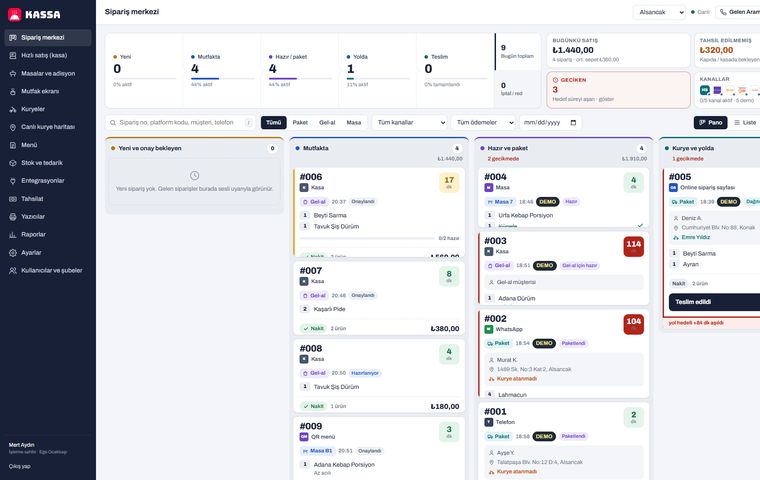
Kassa Restaurant — One-Panel Orders, Kitchen and Courier System
Yemeksepeti, Getir Yemek and Trendyol Yemek orders, QR menu, table billing, kitchen display, live courier tracking and cash-on-delivery reconciliation in one cloud restaurant POS.
View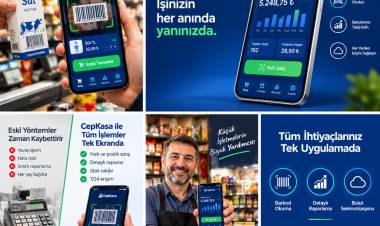
Kassa — iPhone POS & Inventory App
Barcode sales, stock, customer credit and profit reports for grocery stores and kiosks; works offline.
View
Restaurant POS & Order Management
Tables, kitchen and checkout in one system.
ViewHow we work
Free intro call
We clarify needs, existing systems and goals together.
Quote & roadmap
Scope, technology, timeline and budget within 24 hours.
Staged development
Weekly demos and a live test environment.
Launch & support
Go-live, training and ongoing maintenance.
Free pre-analysisThe first meeting and roadmap are completely free, with no obligation.
Staged delivery and approvalYou review each module on a test environment before we move on.
Written scope and rightsScope, delivery and source code rights are defined in the contract.
Frequently asked questions
Can I split the bill in the billing software?
Yes. Payment is taken in one go or split; you can choose cash, card or split payment.
Can I see which tables are occupied in the table management software?
Yes. The floor plan shows occupied and free tables at a glance.
Are QR menu orders added to the bill?
Yes. Orders and waiter calls from the QR menu are linked to the right table.
Do I need a separate program for takeaway and counter sales?
No. Kassa's quick-sale screen handles takeaway and counter sales in the same system.
Does restaurant billing software need extra hardware?
No. Kassa runs in the browser on your existing computers, tablets and phones; a thermal printer is recommended for receipts.
Can waiters enter orders from their phones?
Yes. Kassa runs in the browser on phones and tablets, and users with the waiter role can enter orders for tables.