
Signs your phone may be monitored
- Your partner knows places, conversations or messages you never mentioned
- The battery drains unusually fast, and the phone heats up when not in use
- You receive verification codes you were not expecting
- There are devices you don't recognise on your Apple Account or Google Account
- WhatsApp Linked Devices shows a computer you don't know
- Settings show a VPN, configuration profile or device admin app you don't recognise
The most common ways of tracking
Location sharing: Your location may be shared with your partner in Find My or Google Maps. Shared account: If your partner knows your Apple Account or Google password, they can see your photos, location and backups from another device. WhatsApp Web: If they had your phone for a few seconds, WhatsApp may have been linked to a computer. Tracking app: Apps installed with physical access, especially on Android, can send out message and location data.
Step-by-step check
- iPhone: review sharing and access with Settings > Privacy & Security > Safety Check
- Apple Account / Google Account: remove devices you don't recognise from the device list, change your password, turn on two-step verification
- WhatsApp: log out of all sessions in Settings > Linked Devices
- Location: check who you share your location with in Find My and Google Maps
- Apps: remove any app, profile, VPN or device admin you don't recognise; Android check guide
- Scan your iPhone with the security scan app
Your safety comes first
If you suspect you are being tracked and are in danger, removing the app right away may alert the person tracking you; first get support from a safe phone. Contact local emergency services or a domestic-violence support line; in Turkey: ALO 183 Social Support Line, 155 Police or 112, and the KADES app. This page is for technical information; for legal and psychological support, please contact professionals.
What I offer
Warning signs
Signs that you are being tracked.
Safety Check
Turn off sharing from one screen on iPhone.
Account check
Apple Account and Google device lists.
WhatsApp
Log out of linked devices.
Location
Check location sharing and tracking devices.
Scan
Scan for 24 threat signatures on iPhone.
Technologies I use
Example projects
A selection of live projects serving real users.
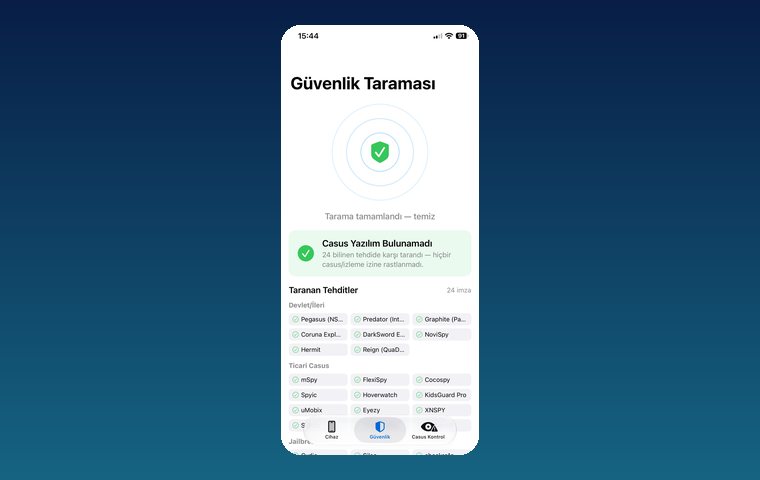
iPhone Security Scan — Spyware Detection
iOS app that scans for state-grade spyware, hidden tracking apps and jailbreak traces.
View
MobilEksper — Phone Inspection & Repair Shop Software
AI-assisted device inspection, IMEI and parts checks, repair service and inventory management.
ViewHow we work
Free intro call
We clarify needs, existing systems and goals together.
Quote & roadmap
Scope, technology, timeline and budget within 24 hours.
Staged development
Weekly demos and a live test environment.
Launch & support
Go-live, training and ongoing maintenance.
Free pre-analysisThe first meeting and roadmap are completely free, with no obligation.
Staged delivery and approvalYou review each module on a test environment before we move on.
Written scope and rightsScope, delivery and source code rights are defined in the contract.
Frequently asked questions
Is my partner tracking my phone? How can I tell?
Check location sharing, the device list on your Apple Account or Google Account, WhatsApp Linked Devices, and any apps, profiles or VPNs on the phone you don't recognise. On iPhone, Safety Check shows most of these on one screen.
Can my partner track me without installing an app on my phone?
Yes. If they know your Apple Account or Google password, they can see your location, photos and backups from another device. That is why changing your password and removing unknown devices is the first step.
Is a factory reset enough?
A reset removes most apps installed on the phone; but if the tracking is done through your account, a reset is not enough: your password and device list must also be cleaned up.
Can I scan my phone myself?
The iPhone security scan app checks for 24 known threat signatures: spyware such as Pegasus and Predator, commercial tracking apps such as mSpy, FlexiSpy and Cocospy, and jailbreak traces. For Android, the checks you can make in Settings are explained on this page.
What should I do if I find out I am being tracked?
If you suspect you are being tracked and are in danger, removing the app right away may alert the person tracking you; first get support from a safe phone. Contact local emergency services or a domestic-violence support line; in Turkey: ALO 183 Social Support Line, 155 Police or 112, and the KADES app.