
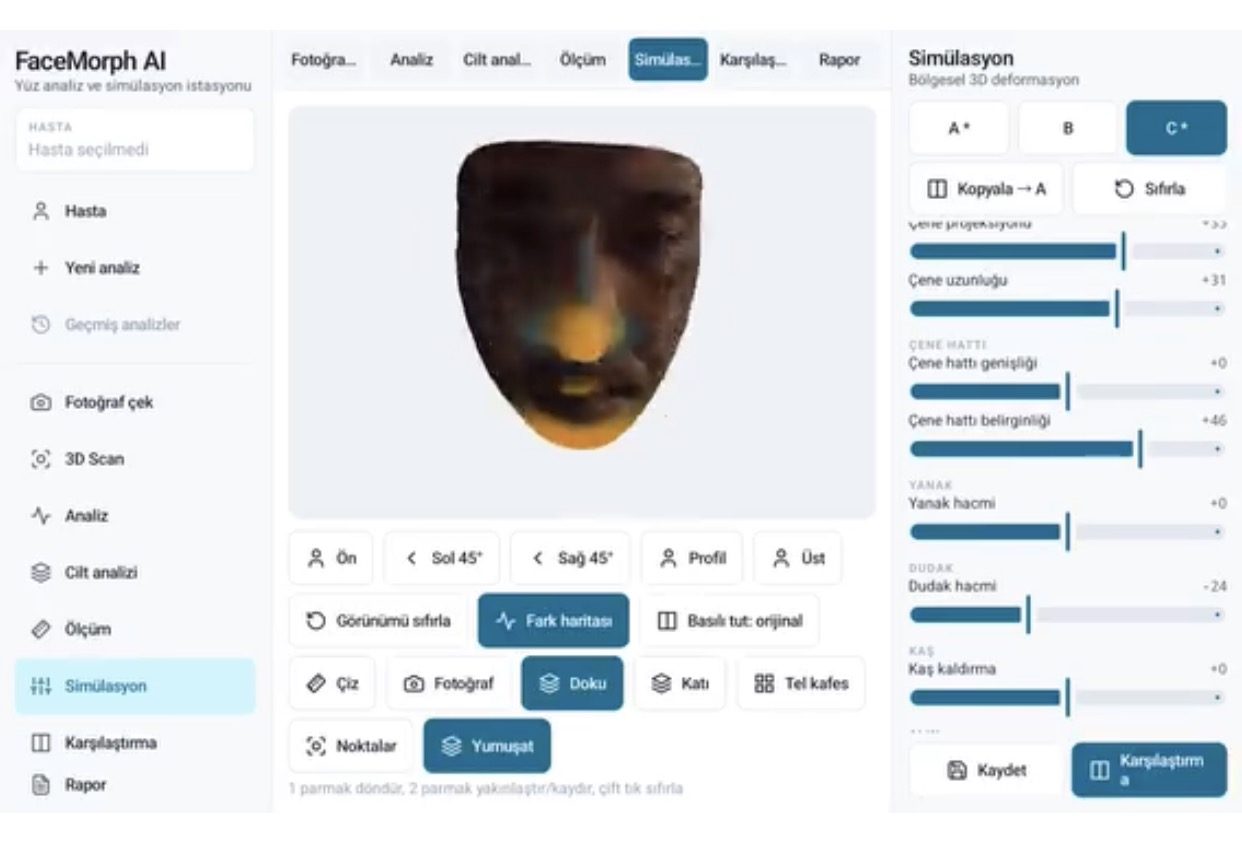
How does FaceMorph AI work?
- Capture: face scan via photos at standard angles or the camera (with an alignment guide based on the previous capture)
- Landmarks: a 478-point face map is extracted with MediaPipe
- 3D model: textured 3D face; front, left/right 45°, profile and top views, with touch rotation and zoom
- Analysis and measurement: symmetry, proportions, and measurements of the forehead, brows, eyes, nose, cheeks, lips, chin and jawline, plus skin analysis
- Simulation: region-based 3D deformation, with three A/B/C variants for the same client
- Comparison: difference map, press-and-hold to view the original, side-by-side before and after
- Report: PDF report with measurements and images
Treatments that can be simulated
- Fillers: lips, cheekbones, cheeks, chin, jawline, nasolabial folds, marionette lines, under-eyes and facial contour
- Botox: forehead, glabella (between the brows), around the eyes and brow lift
- Lifting: facial contour, jawline and cheek tightening
- Skin quality: skin appearance for mesotherapy and similar treatments
Why do clinics use 3D simulation?
Before the treatment, the client sees the intended change on their own face; expectations become clear, and specialist and client discuss the same image. Measurements and before and after records are compared during follow-up consultations. The app offers a Turkish, English, German and Russian interface, so it can be used directly in consultations with international clients in medical tourism. Patient records are stored on the device, with PIN lock and an activity log (audit).
3D / 4D simulation and visualization projects
Beyond FaceMorph AI, I develop custom 3D/4D visualization software for your clinic or product: a web portal where clients upload photos and receive a preliminary assessment, simulation modules for breast and body aesthetics, viewing on VR headsets, a white-label app branded for your clinic, and CRM integration. The simulation is a visual preview; it is not a medical diagnosis or a guarantee of results. Built on: AI integration, Android app development.
What I offer
3D face model
Textured model, 5 standard views.
478-point landmarks
Precise face map and measurement.
Regional simulation
Filler, Botox and lifting settings.
A/B/C variants
Three alternatives for one client.
Difference map
Changed regions shown in color.
PDF report
Measurement and before/after report.
Technologies I use
Example projects
A selection of live projects serving real users.

Inspectra — AI Quality Control & OEE
Edge-AI iOS app for camera-based visual quality inspection.
View
Ege Auto Life — Local SEO & AI Damage Analysis
Local SEO website and AI damage analysis for a paintless dent repair shop in Bornova, Izmir.
ViewHow we work
Free intro call
We clarify needs, existing systems and goals together.
Quote & roadmap
Scope, technology, timeline and budget within 24 hours.
Staged development
Weekly demos and a live test environment.
Launch & support
Go-live, training and ongoing maintenance.
Free pre-analysisThe first meeting and roadmap are completely free, with no obligation.
Staged delivery and approvalYou review each module on a test environment before we move on.
Written scope and rightsScope, delivery and source code rights are defined in the contract.
Frequently asked questions
What is 3D aesthetic simulation software?
It is software that turns a client's face into a 3D model, measures it, and shows the possible look of treatments such as fillers, Botox and lifting before the procedure.
Which device does FaceMorph AI run on?
It runs on Android tablets, with a clinic-station interface designed for landscape, touch-based use.
Does the simulation guarantee the actual result?
No. The simulation is a visual preview for managing expectations; it is not a medical diagnosis or a guarantee of results.
Can we use it with our clinic's logo?
Yes. A white-label version branded for your clinic, the report template and language options can be configured.
Can breast or body simulation be done?
FaceMorph AI is face-focused; simulation modules for breast and body aesthetics are developed as custom projects.
What is aesthetic simulation software?
It is software that turns a client's face into a 3D model from photos and camera input, measures it and shows the possible post-treatment look in advance; aesthetic surgery and medical aesthetic clinics use it to manage expectations.
Which languages does it support?
The interface is available in Turkish, English, German and Russian, so it can be used directly with international clients in medical tourism.
Where is patient data stored?
Patient records are stored on the device, with PIN lock and an activity log (audit).