

Self checkout vs a staffed till
A staffed barcode POS software is built for speed in trained hands: shortcut keys, keyboard, and refund and discount rights sit with the cashier. Self checkout is built so that a first-time customer can finish without mistakes; every step is guided on screen and anything that needs authority is tied to attendant approval.
- User: a trained cashier on a barcode POS, the customer at self checkout.
- Interface: dense screens and shortcuts on a barcode POS, large step-by-step touchscreens at self checkout.
- Control: the cashier's eye on a barcode POS, weight/random checks and attendant approval at self checkout.
- Refund, void, discount: done by the cashier on a barcode POS, unlocked by attendant approval at self checkout.
For general kiosk hardware and locked operation, see the kiosk software page.
Main service page for this topic: self-service kiosk software
Scanning, weighed items and promotions
- Barcode scanning: the item barcode is scanned and its name, price and image appear on screen.
- Non-barcoded items: items such as fruit and vegetables are chosen from a visual list.
- Weighed items: weight is read from an integrated scale, or the price/weight barcode on a scale label is decoded.
- Promotions: buy X pay Y, discount on the second item and loyalty card prices applied to the basket automatically.
- Bags and payment: bag selection, card payment and receipt.
Prices, promotions and barcode definitions are not typed into the kiosk; they come from the store's stock or ERP system.
Security and loss prevention
For the retailer, the most critical issue with self checkout is shrinkage. The control setup is defined according to the store's product mix.
- Random checks: selected transactions are routed to an attendant for a basket check.
- Staff approval: age-restricted items, item removal, voids and refunds are unlocked with an attendant card or PIN.
- Weight verification: if the bagging area scale does not match the scanned item, the transaction pauses.
- Attendant panel: one attendant monitors the status and help requests of several tills from one screen.
- Audit log: approvals and voids are logged with who and when.
Payment, receipts and stock/ERP integration
Card payments are taken through a certified terminal from the bank or payment provider using the provider's SDK; card data is not stored in the kiosk software. For a self checkout that sells, local fiscal receipt requirements (in Türkiye: e-Arşiv invoice or new-generation cash register integration) are clarified with your accountant at the start of the project.
Stock is deducted at the moment of sale, and end-of-day and till reports are collected in the same place as the staffed tills. If your existing supermarket POS software or ERP has an API, the self checkout connects to it; for the connection setup, see API integration.
Which businesses is it right for?
Self checkout pays off in supermarkets with few items per basket and queues at peak times, in chain stores, in campus and on-site factory shops, and in quick-shop retail points. It runs alongside staffed tills on the same stock and promotion infrastructure.
The experience on the barcode POS side comes from the Kassa iPhone POS/stock app and a multi-branch clothing store program; the experience on the self-service kiosk side comes from the card-operated PPE dispensing kiosk running live at Brisa facilities.
What I offer
Barcode scanning
Straight to basket with name, price, image
Weighed items
Scale integration and scale label reading
Automatic promotions
Buy X pay Y, loyalty prices in basket
Random checks
Route transactions to attendant checks
Staff approval
Voids, refunds and age-restricted items
Stock/ERP link
Stock deducted on sale, shared reports
Technologies I use
Example projects
A selection of live projects serving real users.
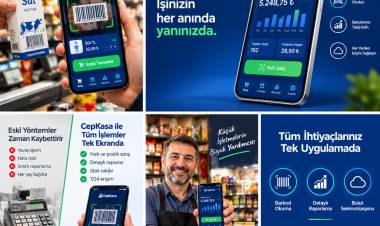
Kassa — iPhone POS & Inventory App
Barcode sales, stock, customer credit and profit reports for grocery stores and kiosks; works offline.
View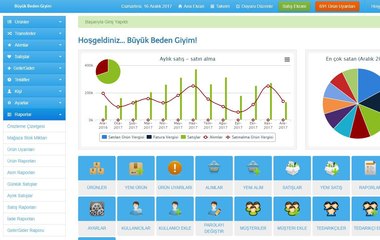
Clothing Store POS — Barcode Sales & Multi-Store
Used by Büyük Beden Giyim stores: barcode sales, transfers between stores, stock alerts and sales reports.
ViewISG Virtual Warehouse Dispatch Assistant
Occupational safety ERP with REST API and BI dashboard.
ViewHow we work
Free intro call
We clarify needs, existing systems and goals together.
Quote & roadmap
Scope, technology, timeline and budget within 24 hours.
Staged development
Weekly demos and a live test environment.
Launch & support
Go-live, training and ongoing maintenance.
Free pre-analysisThe first meeting and roadmap are completely free, with no obligation.
Staged delivery and approvalYou review each module on a test environment before we move on.
Written scope and rightsScope, delivery and source code rights are defined in the contract.
Frequently asked questions
What is self checkout?
Self checkout is a self-service till where customers scan their own items and pay without a cashier. One attendant supervises several tills and approves actions that need authority.
What is the difference between self checkout and barcode POS software?
Barcode POS software is designed for a trained cashier to work fast. Self checkout guides the customer step by step to finish without mistakes; actions such as voids, refunds and discounts require attendant approval.
How is theft prevented at self checkout?
Random basket checks, weight verification in the bagging area, staff approval for age-restricted items and voids, and logging of every approval are used together. The setup is defined according to the store's product mix.
How does self checkout sell weighed items?
The till reads the weight from an integrated scale, or calculates the amount by reading the price/weight barcode printed by the scale on the shop floor. Non-barcoded items are chosen from a visual list.
Can self checkout be added to my existing POS software?
If your current supermarket POS or ERP has an open API, the self checkout takes product, price, promotion and stock data from it and posts sales back to it. If there is no API, data exchange options are assessed together.
How long does self checkout software take to build?
The timeline depends on scale and payment terminal integration, the variety of promotion rules, ERP integration and the loss prevention setup. Once the scope is clear, a phased plan is drawn up.