

What does Belgetara do?
Invoices, rental agreements, ID cards, receipts, lecture notes or business paperwork: storing, finding and sending paper documents takes time. Belgetara turns a document into a clean PDF in seconds, reads its text to make it searchable and lets you share it with a single tap. No desktop scanner, photocopier or computer needed.
The home screen has Scan, Photo, ID and File shortcuts. Documents can be added to favorites and grouped with tags such as "Invoices"; the search box looks through titles, tags and the text inside each document. The app runs on iPhone and iPad.
Smart scanning: edge detection, perspective and shadow correction
- The document is detected in the camera view, edges are found automatically and the shot is taken when you hold steady
- A document shot at an angle is turned into a flat page with perspective correction
- Shadow removal reduces glare spots and hand shadows
- Multi-page scanning: pages are captured one after another and saved as a single document
- Import photos and files from your library; a dedicated scan mode for ID cards
The scanned document is exported as PDF or shared directly, sent to email, WhatsApp or the Files app in one step.
Every document searchable with Turkish OCR
Belgetara converts the writing on a scanned page into text and recognizes multiple languages, Turkish included. Text can be viewed page by page or all at once, with word and character counts. You can copy, translate and share the text; a customer number or due date on an invoice is captured without typing it by hand.
The real benefit of OCR is search: find a contract you scanned months ago in seconds by a name or amount it contains. Details on the Turkish OCR and text recognition page.
Signing, redaction and editing
Instead of printing a document to sign it, you place your saved signature on it on screen; add text, dates, highlights and pen markup. Information that should not be shared, such as a Turkish ID number, IBAN or address, is covered with permanent redaction; the redacted area cannot be revealed in the exported document. Details on the PDF signing and document redaction page.
AI summaries of long documents in seconds
For a long contract or report, a short summary, detailed report, bullet-point summary, key information (dates, amounts, parties), to-do list and title suggestion are prepared with a single tap. You can ask the document questions directly: "What is the due date?" or "How many days' notice is required for termination?". The app clearly shows the user that the document text is used only for this operation.
More on the AI document summarization page. If you need a scanning or OCR solution built for your own company, see the custom document scanning and OCR app development page.
What I offer
Smart scanning
Automatic edge, perspective and shadow correction.
Multi-page PDF
Combine pages into one document and share.
Turkish OCR
Copy, translate and search text in documents.
Signing and redaction
Saved signature, permanent redaction, text and date.
AI
Summary, key information, to-dos, ask questions.
Organized archive
Favorites, tags and full-text search.
Technologies I use
Example projects
A selection of live projects serving real users.
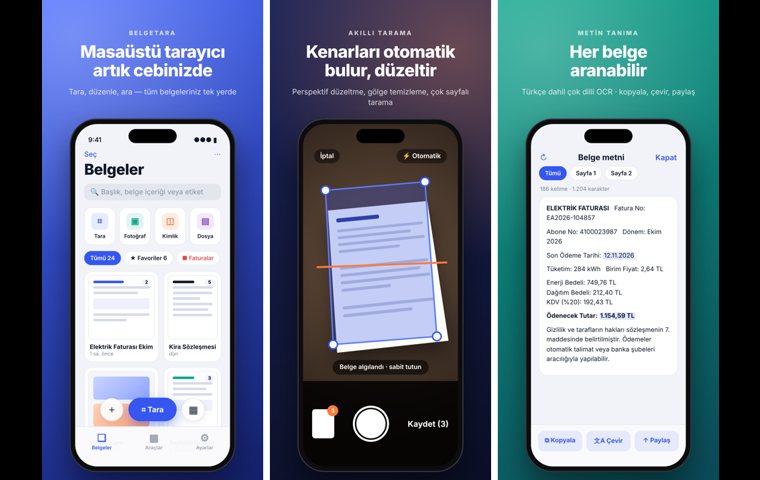
Belgetara — iPhone and iPad Document Scanner App
Automatic edge detection, multi-page PDF, Turkish OCR, signature and permanent redaction, AI document summaries and asking questions about a document.
View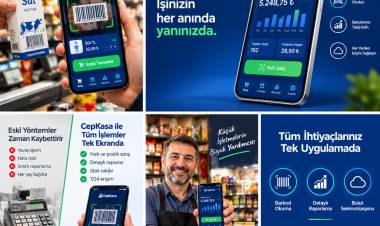
Kassa — iPhone POS & Inventory App
Barcode sales, stock, customer credit and profit reports for grocery stores and kiosks; works offline.
View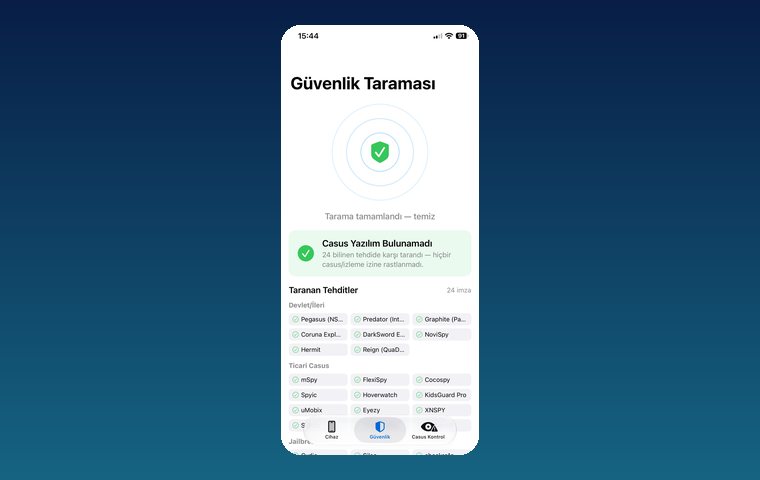
iPhone Security Scan — Spyware Detection
iOS app that scans for state-grade spyware, hidden tracking apps and jailbreak traces.
ViewHow we work
Free intro call
We clarify needs, existing systems and goals together.
Quote & roadmap
Scope, technology, timeline and budget within 24 hours.
Staged development
Weekly demos and a live test environment.
Launch & support
Go-live, training and ongoing maintenance.
Free pre-analysisThe first meeting and roadmap are completely free, with no obligation.
Staged delivery and approvalYou review each module on a test environment before we move on.
Written scope and rightsScope, delivery and source code rights are defined in the contract.
Frequently asked questions
Which devices does Belgetara run on?
Belgetara is an iOS app built for iPhone and iPad.
Is Belgetara paid?
All features are currently offered free of charge.
How can I try Belgetara?
Until the App Store release, the app can be tested for free with TestFlight, Apple's beta app; just open the TestFlight link on this page on your iPhone or iPad.
Does it recognize Turkish text?
Yes. OCR recognizes text in multiple languages, Turkish included; the text can be copied, translated and used to search documents.
Can scanned documents be shared as PDF?
Yes. Single or multi-page documents are exported as PDF and shared via email, WhatsApp or the Files app.
Can I hide information such as ID numbers or IBANs?
Yes. Permanent redaction covers the selected area, and it cannot be revealed in the exported document.
How does the AI use my document?
When you request a summary or ask a question, the document text is used only for that operation; the app shows this to the user on the operation screen.