
Myths vs. real warning signs
Crackling, echo, clicking or short drop-outs during a call are usually down to weak signal, switching between VoLTE and Wi-Fi Calling, or a problem with the earpiece or speaker. These sounds alone do not mean your phone is being tapped.
- Myth: Crackling and echo prove someone is listening.
- Myth: A warm phone must be bugged; heat is almost always caused by heavy use or charging.
- Worth checking: The microphone or camera indicator lights up when you are not using it.
- Worth checking: An app you do not recognise, with a hidden icon or a name that imitates a system app.
- Worth checking: Calls going to another number before they reach you.
- Worth checking: Changes that appeared after your phone was out of your hands for a while.
Check the microphone and camera indicators
On iPhone an orange dot appears at the top of the screen while an app uses the microphone, and a green dot while it uses the camera. Open Control Center and it shows which app accessed them most recently. Recent Android versions also show a green indicator in the top-right corner while the microphone or camera is in use; tap it to see which app it is.
If these indicators light up when you are not on a call, recording audio or using the camera, note the app and review its permissions. For a deeper scan, see the iPhone spyware detection and Android spyware detection pages.
App permissions and the *#21# forwarding check
- Go to the privacy/permissions section in Settings and go through every app with microphone, camera or location access.
- Turn off access for any app you do not recognise or that has no reason to need it.
- On iPhone, use Safety Check under Settings > Privacy & Security to review what you share and who has access.
- On Android, run a Google Play Protect scan and check which apps have device admin rights.
- Dial *#21# on your phone keypad; this code shows your call forwarding status. If calls are being forwarded to a number you do not know, contact your carrier and have it switched off.
The *#21# code does not reveal apps installed on the phone; it only shows the call forwarding settings on your line. That is why it should be combined with the permissions and app checks.
Still suspicious? What to do next
- Update your phone to the latest operating system version.
- Change your Apple Account, Google account and email passwords from a safe device and turn on two-factor authentication.
- Change your screen lock passcode to a new one nobody else knows.
- If needed, check your backup and factory reset the device.
If you suspect you are being tracked and are in danger, removing the app straight away can alert the person monitoring you; first get support from a safe phone. In an emergency call your local emergency number (112 in Europe, 911 in the US), or contact a domestic abuse helpline in your country.
If you cannot settle it on your own, you can book a phone security check remotely via WhatsApp or in person in İzmir. If your concern is about your location, the is my location being tracked guide also helps.
What I offer
Myth vs. fact
What really causes crackle and echo
Orange/green dot
Microphone and camera indicator check
Permission audit
Microphone, camera, location access
*#21# check
See your call forwarding status
Safe next steps
Getting help without tipping anyone off
Expert check
Remote or in person in İzmir
Technologies I use
Example projects
A selection of live projects serving real users.
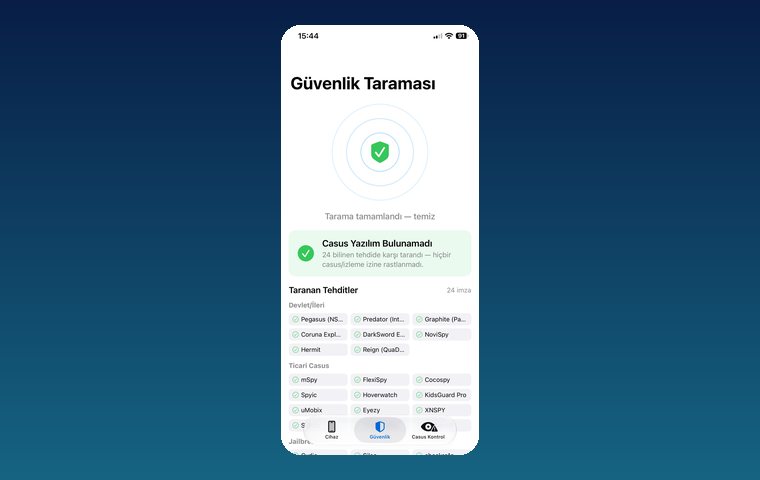
iPhone Security Scan — Spyware Detection
iOS app that scans for state-grade spyware, hidden tracking apps and jailbreak traces.
View
Pingora — Number-Free Messaging
Secure messaging and video calls without sharing a phone number.
View
MobilEksper — Phone Inspection & Repair Shop Software
AI-assisted device inspection, IMEI and parts checks, repair service and inventory management.
ViewHow we work
Free intro call
We clarify needs, existing systems and goals together.
Quote & roadmap
Scope, technology, timeline and budget within 24 hours.
Staged development
Weekly demos and a live test environment.
Launch & support
Go-live, training and ongoing maintenance.
Free pre-analysisThe first meeting and roadmap are completely free, with no obligation.
Staged delivery and approvalYou review each module on a test environment before we move on.
Written scope and rightsScope, delivery and source code rights are defined in the contract.
Frequently asked questions
Does crackling on calls mean my phone is tapped?
No. Crackling, echo and drop-outs are mostly caused by network quality, VoLTE/Wi-Fi Calling handovers or hardware. Microphone indicators, permissions and forwarding status are far more meaningful signs.
What does *#21# do?
*#21# shows the call forwarding status on your line. If you see forwarding to a number you do not know, ask your carrier to turn it off. The code does not show apps installed on the phone.
What does the orange dot on my iPhone mean?
The orange dot means an app is using the microphone; the green dot means the camera is in use. Open Control Center to see which app accessed it.
Will a factory reset stop someone listening?
It removes most stalkerware installed on the device, but if someone else knows your account passwords the problem can come back. After the reset, change your passwords and turn on two-factor authentication.
I think my partner is listening to my phone. What should I do?
Deleting the app straight away can alert the person monitoring you. First get support from a safe phone; in an emergency call your local emergency number (112 in Europe, 911 in the US) or a domestic abuse helpline in your country.