
The realistic risk: not everyone is a target
Mercenary spyware is an advanced tool that can get onto a phone without the user tapping anything (zero-click). That is why it is so costly and used in state-backed, targeted operations.
- Higher risk: journalists, human rights defenders, lawyers, politicians, senior executives and the people close to them.
- Low risk: most users outside these profiles; for them the real danger is phone tracking apps and stolen accounts.
- A warm battery or slowdown on its own is not a sign of Pegasus; this kind of software is designed to leave no visible trace.
For general concerns, start with the is my phone tapped guide.
If you received an Apple threat notification
Apple sends a notification to users it detects may have been targeted by mercenary spyware, via the email and iMessage registered to their Apple Account; the notice also appears at the top of the page when you sign in to your Apple Account online.
- Verify the notification by signing in to your Apple Account page yourself, without tapping any link in the message you received.
- Apple threat notifications never ask you to tap a link, install an app or enter a password.
- Turn on Lockdown Mode immediately and update iOS.
- Move sensitive conversations to another, secure device and get expert digital security support.
How to protect yourself
- Always keep iOS up to date. Most vulnerabilities used in these attacks are closed by updates.
- Restart your phone every day. Some spyware is not persistent and can be cleared by a restart, although it can be reinstalled.
- Use Settings > Privacy & Security > Lockdown Mode to restrict attack surfaces such as message attachments, link previews and some web technologies.
- Do not open links or files from people you do not know; be careful with unknown senders on iMessage and FaceTime.
- Use two-factor authentication and a strong password on your Apple Account.
How is a forensic analysis done?
Definitive detection of mercenary spyware is done with forensic tools that search a phone's backup and system logs for known indicators of compromise. Open-source tools such as the Mobile Verification Toolkit (MVT) developed by Amnesty International are used for this purpose.
These analyses can only catch known traces; a clean result is not an absolute guarantee, it means no known indicators were found. Hakan Sevimoğlu scans for known signatures with the iPhone Security Scan app and, where needed, reports findings as part of the phone security check service.
What I offer
Threat notification
Verify that an Apple alert is genuine
Lockdown Mode
The iOS mode that shrinks attack surface
Up-to-date iOS
First line of defence against exploits
Daily restart
Clears non-persistent malware
Forensic analysis
Searching backups and logs for traces
24 threat signatures
Scanning with iPhone Security Scan
Technologies I use
Example projects
A selection of live projects serving real users.
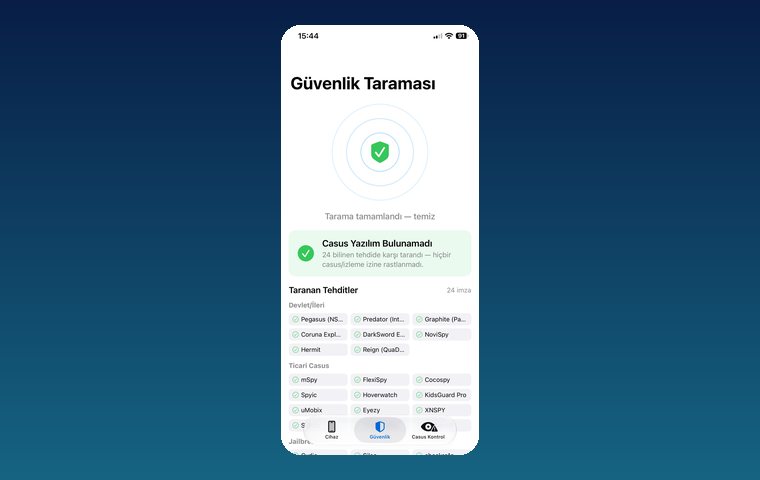
iPhone Security Scan — Spyware Detection
iOS app that scans for state-grade spyware, hidden tracking apps and jailbreak traces.
View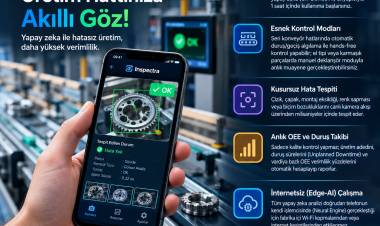
Inspectra — AI Quality Control & OEE
Edge-AI iOS app for camera-based visual quality inspection.
ViewHow we work
Free intro call
We clarify needs, existing systems and goals together.
Quote & roadmap
Scope, technology, timeline and budget within 24 hours.
Staged development
Weekly demos and a live test environment.
Launch & support
Go-live, training and ongoing maintenance.
Free pre-analysisThe first meeting and roadmap are completely free, with no obligation.
Staged delivery and approvalYou review each module on a test environment before we move on.
Written scope and rightsScope, delivery and source code rights are defined in the contract.
Frequently asked questions
Could my phone be infected with Pegasus?
Pegasus is an expensive, targeted tool; unless you are a journalist, activist, lawyer or executive, the chance is low. Still, keeping iOS updated and restarting your phone regularly is good practice for everyone.
I got a threat notification from Apple. Is it real?
Genuine Apple notifications never ask you to tap a link or enter information. If the notice appears at the top when you sign in to your Apple Account page yourself, it is real.
Does Lockdown Mode make my phone unusable?
No, but it restricts some features: message attachments, link previews and certain web features are limited. It is recommended for people who believe they may be targeted.
Does restarting the phone remove Pegasus?
Some versions are not persistent and can be cleared from memory by a restart, but the attacker can reinfect the device. That is why restarting should be combined with updates and Lockdown Mode.
How is Pegasus detected for certain?
Definitive detection uses forensic tools that search the phone's backup and system logs for known indicators of attack. A clean result shows that no known traces were found.