
Signs your phone has been hacked
Do not assume you have been hacked just because the battery drains fast or the phone gets warm; that is usually an ageing battery and heavy use. These signs deserve far more attention:
- Apps you do not remember installing, or apps with no visible icon
- An unknown device admin, VPN or configuration profile in Settings
- Sign-in alerts you do not recognise on your email, Apple Account, Google or social media accounts
- Messages or links sent to your contacts that you never sent
- Sessions you do not recognise in WhatsApp's Linked devices list
- The microphone or camera indicator lighting up when you are not using them
Step-by-step checklist
- Update: Install the latest operating system and app updates.
- Unknown apps: Go through your full app list and remove anything you do not recognise.
- Admin and profiles: On Android, check device admin apps; on iPhone, check Settings > General > VPN & Device Management and delete any profile you do not recognise.
- Permissions: Review apps with microphone, camera, location, accessibility and notification access.
- Scan: On Android, run a Google Play Protect scan; on iPhone, reset sharing with Safety Check.
- Accounts: Remove unknown devices via Google Security Checkup and your Apple Account device list.
Change passwords and turn on two-factor authentication
Change your passwords from another device you trust, not from the suspect phone. Start with your email account, because password reset links for everything else go there. Then change your Apple Account or Google account, banking, WhatsApp and social media passwords.
Turn on two-factor authentication (2FA) for every account, ideally with an authenticator app rather than SMS. In WhatsApp, set a Two-step verification PIN. If an account has been taken over, follow the WhatsApp account hacked, Instagram account hacked and Apple ID compromised guides.
If the problem continues
If symptoms persist after every step, check your backup, factory reset the device and reinstall apps from the store rather than restoring them from the backup. If you are a journalist, lawyer or otherwise at risk of targeted attacks, consider turning on Lockdown Mode on your iPhone and read the Pegasus spyware check page.
If you suspect you are being tracked and are in danger, removing the app straight away can alert the person monitoring you; first get support from a safe phone. In an emergency call your local emergency number (112 in Europe, 911 in the US), or contact a domestic abuse helpline in your country.
If you cannot be sure on your own, a phone security check remotely via WhatsApp or in person in İzmir reviews your phone and gives you a report.
What I offer
Real warning signs
Clear signals, not myths
Checklist
Practical step-by-step checks
Profiles and admins
Find and remove hidden privileges
Account security
New passwords and 2FA
Targeted attacks
Lockdown Mode and spyware
Expert report
Remote or in-person check in İzmir
Technologies I use
Example projects
A selection of live projects serving real users.
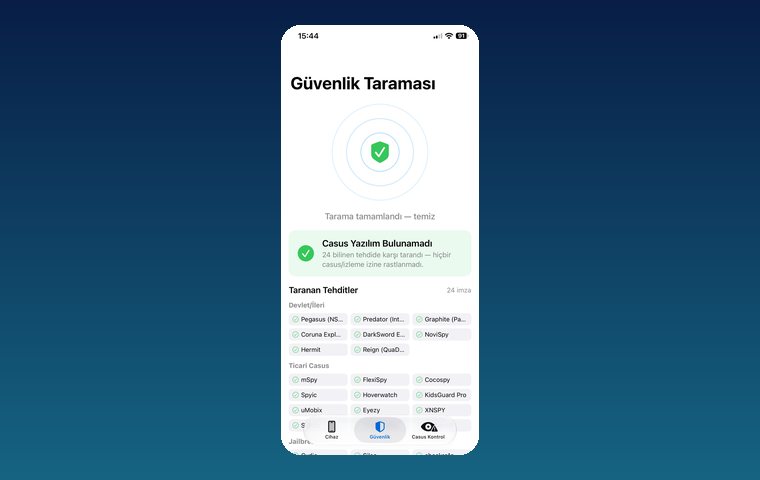
iPhone Security Scan — Spyware Detection
iOS app that scans for state-grade spyware, hidden tracking apps and jailbreak traces.
View
MobilEksper — Phone Inspection & Repair Shop Software
AI-assisted device inspection, IMEI and parts checks, repair service and inventory management.
View
Pingora — Number-Free Messaging
Secure messaging and video calls without sharing a phone number.
ViewHow we work
Free intro call
We clarify needs, existing systems and goals together.
Quote & roadmap
Scope, technology, timeline and budget within 24 hours.
Staged development
Weekly demos and a live test environment.
Launch & support
Go-live, training and ongoing maintenance.
Free pre-analysisThe first meeting and roadmap are completely free, with no obligation.
Staged delivery and approvalYou review each module on a test environment before we move on.
Written scope and rightsScope, delivery and source code rights are defined in the contract.
Frequently asked questions
Does fast battery drain mean my phone is hacked?
Not on its own. Battery health, background apps and heavy use are far more common causes. It is worth investigating if it comes with unknown apps, profiles or account sign-ins.
Can an iPhone be hacked?
A non-jailbroken, up-to-date iPhone is hard to infect remotely, but not impossible. The more common risk is someone else knowing your Apple Account password, or changing profiles and settings with physical access to the device.
Is a factory reset enough?
It removes malicious apps from the device. But if your account passwords were stolen, the attacker can get back in, so change your passwords and turn on 2FA after the reset.
Which device should I change my passwords from?
From another device you trust, not the suspect phone, and start with your email account.
Can I get my phone checked?
Yes. Hakan Sevimoğlu carries out phone security checks remotely via WhatsApp or in person in İzmir and reports the findings.