
If you can still sign in
- In Settings, tap your name at the top and change your password under Sign-In & Security.
- On the same screen, check the trusted phone numbers and email addresses, and delete any that are not yours.
- Open the device list under your name; tap every device you do not recognise and choose Remove from Account.
- Make sure two-factor authentication is turned on.
- Use Settings > Privacy & Security > Safety Check (iOS 16 and later) to review sharing, app access and sessions from one screen.
Safety Check lets you quickly stop location sharing and access you have given to other people. Its Emergency Reset option stops all sharing at once.
If you cannot sign in: iforgot.apple.com and Account Recovery
- Go to iforgot.apple.com in a browser and enter your Apple Account email or phone number.
- If you have a trusted device or number, you can reset the password directly.
- If you have access to neither, Apple starts Account Recovery; for security reasons this can include a waiting period, and you are sent status updates throughout.
- While you wait, do not keep trying to sign in from other devices; this can extend the process.
If you previously created a recovery key or added a recovery contact, you can regain access much faster. Once you have the account back, set up both of these options.
Checklist after you regain the account
- Confirm in Find My that your devices are on your account.
- Review third-party apps you signed in to with your Apple Account.
- Remove anyone you do not recognise from Family Sharing and location sharing.
- Change your email password too; Apple Accounts are often taken over through email.
- Do not tap links in SMS or emails claiming to be from Apple saying "your account has been locked".
If you suspect there is a profile, device management (MDM) enrolment or tracking app on the phone that is not yours, see the iPhone spyware detection page or get help from the phone security check service.
If someone close to you has access to your account
A spouse, partner or family member who knows your Apple Account password can see your location, photos and messages. Safety Check was designed for exactly this situation; however, the other person may notice when you cut off sharing.
If you suspect you are being tracked and are in danger, removing the app straight away can alert the person monitoring you; first get support from a safe phone. In an emergency call your local emergency number (112 in Europe, 911 in the US), or contact a domestic abuse helpline in your country.
What I offer
iforgot.apple.com
Apple's official password reset page
Account Recovery
The official route without a trusted device
Safety Check
Cut off sharing and access in one place
Device list
Remove devices you do not recognise
Recovery key
Fast access if it happens again
Recovery contact
Get back in with someone you trust
Technologies I use
Example projects
A selection of live projects serving real users.
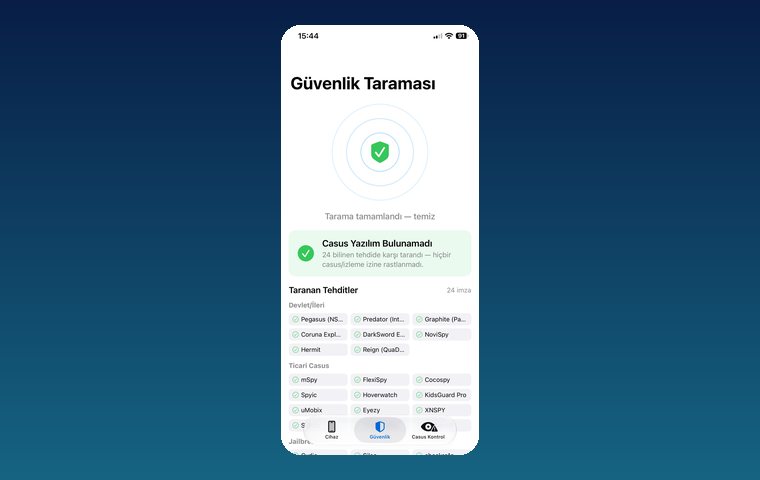
iPhone Security Scan — Spyware Detection
iOS app that scans for state-grade spyware, hidden tracking apps and jailbreak traces.
View
Ezan Vakti – Gümüşpala Hizmet (iOS)
Prayer times, Ramadan calendar, qibla and worship tracking; live on the App Store.
View
Kassa — iPhone POS & Inventory App
Barcode sales, stock, customer credit and profit reports for grocery stores and kiosks; works offline.
ViewHow we work
Free intro call
We clarify needs, existing systems and goals together.
Quote & roadmap
Scope, technology, timeline and budget within 24 hours.
Staged development
Weekly demos and a live test environment.
Launch & support
Go-live, training and ongoing maintenance.
Free pre-analysisThe first meeting and roadmap are completely free, with no obligation.
Staged delivery and approvalYou review each module on a test environment before we move on.
Written scope and rightsScope, delivery and source code rights are defined in the contract.
Frequently asked questions
My Apple ID password was changed. How do I get it back?
Enter your account at iforgot.apple.com and follow the reset steps. If you have no access to a trusted device or number, Apple starts the Account Recovery process.
Why does Apple Account Recovery make me wait?
Account Recovery can deliberately include a waiting period to protect the real owner of the account. Repeatedly trying to sign in during this time can extend the process.
Where is Safety Check?
On iOS 16 and later it is under Settings > Privacy & Security > Safety Check. It lets you review sharing and access or run an Emergency Reset.
A device I do not recognise is on my account. What should I do?
In Settings, tap your name, select that device from the device list and remove it from your account; then change your password and check two-factor authentication.
Should I choose a recovery key or a recovery contact?
A recovery contact is more practical for most people. A recovery key gives tighter security, but if you lose the key it becomes harder to get into your account, so keep it somewhere safe.