
Rejection vs removal vs suspension
- Rejection: The update or new app you submitted is not published; the current version may remain unaffected.
- Removal: The app is taken off the store; you can return by fixing the issue and submitting a new release.
- Suspension: Applied to more serious or repeated violations and can also affect the developer account; appeals and careful fixes matter here.
The most common policy violations
- Data safety form: The data collection declared in the form does not match the real behaviour of the app and the SDKs it uses.
- SMS and Call Log permissions: These can only be used if the app's core functionality requires them and the declaration form is approved.
- Background location: Rejected unless needed for a feature clearly shown to the user; an in-app disclosure and declaration are required.
- Target API level: Apps below Google's current target API level cannot submit updates or may become invisible to new users.
- Privacy policy and account deletion: A missing policy link, or no way to delete an account in apps where accounts can be created.
- Metadata: Misleading title, description or screenshots.
Closed testing requirement for new personal accounts
For newly created personal developer accounts, Google requires a closed test with a set number of testers for a set period before the app can be published to production. Production access is not granted until this is met. Check the current conditions shown for your account in Play Console and build the testing period into your release schedule from the start.
Step-by-step fix and appeal
- Read the policy notice and email in Play Console; identify the violated policy and the affected release.
- Review the app and the SDKs you use for their real behaviour; remove unnecessary permissions.
- Update the Data safety form, permission declarations and privacy policy.
- Raise the target API level, build a new release and submit it.
- If you believe the decision is wrong, appeal through Play Console; explain concretely why you comply.
If the app needs extensive rework, it can be handled as part of the Android app development service. If you are facing a rejection on iOS, see the App Store rejection fix page.
What I offer
Policy analysis
Root cause of the notified violation
Data safety fix
Align the form with real data flows
Permission cleanup
SMS, Call Log and location permissions
Target API update
Upgrade to the current API level
Closed test plan
Testing process for new accounts
Appeal preparation
Concrete, policy-based appeal
Technologies I use
Example projects
A selection of live projects serving real users.
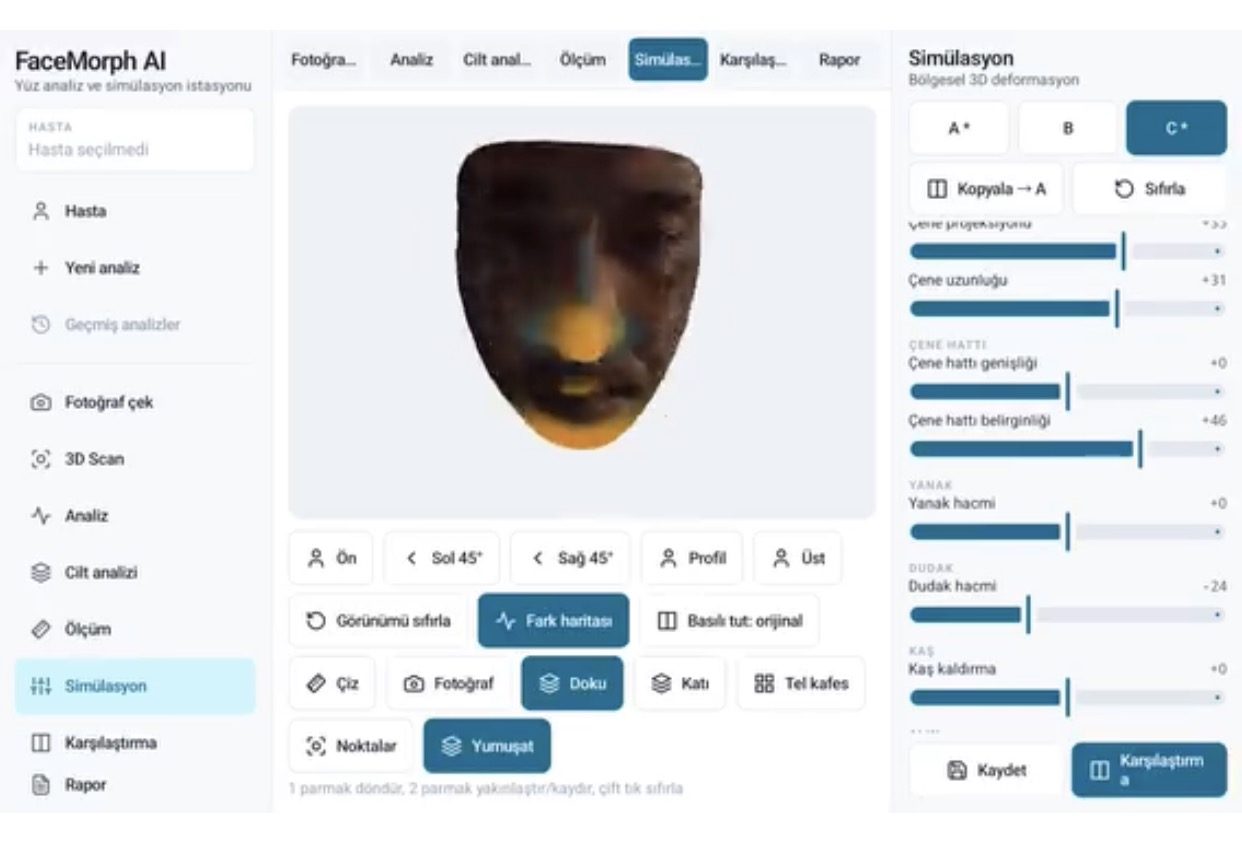
FaceMorph AI — 3D Face Analysis & Aesthetic Simulation
3D face analysis, measurement, filler/Botox/lifting simulation, before/after comparison and PDF reports for aesthetic clinics.
View
NSİ ECDIS — Turkish-Made ECDIS Training Simulator
ECDIS training simulator for maritime high schools and faculties: ENC charts, route planning, navigation calculations, Turkish/English and day/night modes.
View
Taxi, Fleet & POS Platform
Passenger, driver and fleet apps with live dispatch and POS.
ViewHow we work
Free intro call
We clarify needs, existing systems and goals together.
Quote & roadmap
Scope, technology, timeline and budget within 24 hours.
Staged development
Weekly demos and a live test environment.
Launch & support
Go-live, training and ongoing maintenance.
Free pre-analysisThe first meeting and roadmap are completely free, with no obligation.
Staged delivery and approvalYou review each module on a test environment before we move on.
Written scope and rightsScope, delivery and source code rights are defined in the contract.
Frequently asked questions
My app was removed from Google Play. Can it come back?
In most cases, yes. When you fix the violation and submit a new release, the app is reviewed again. With a suspension, the appeal process becomes more important.
Why is a Data safety form rejected?
It is rejected when the data you declare does not match what the app or its SDKs (analytics, ads, crash reporting) actually collect.
Can I use SMS or Call Log permissions?
Only if your app's core functionality requires them and the permission declaration in Play Console is approved. Otherwise the permission must be removed.
Why can't I publish directly from my new account?
New personal developer accounts must run a closed test with a set number of testers for a set period before going to production. The current conditions are shown in Play Console.
When does an appeal work?
When you can show concretely that the decision was wrong. If there is a real violation, fixing it first and submitting a new release gets results faster.